
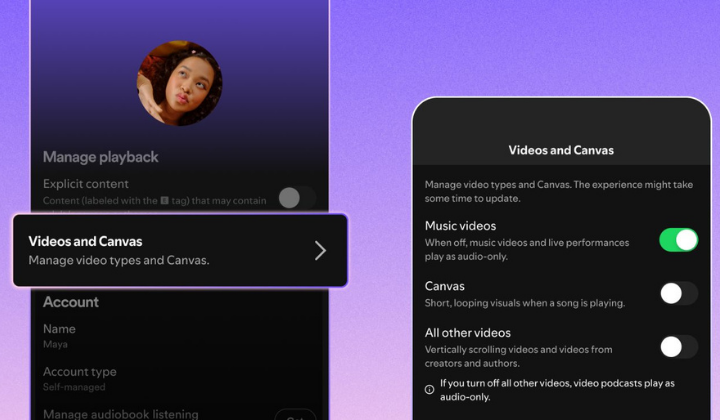

Spotify is finally letting us kill the videos on the app if we want to.They are rolling out new controls that let you completely switch off video content throughout the app, which is a win for anyone who just wants to focus on the tunes without the extra visual clutter.
You can find the new toggles by heading into settings, then content and display. From there, you can bin those looping Canvas visuals and turn off videos for music and podcasts too. The best bit is that once you have picked your preference, it syncs everywhere. Whether you are on your mobile, desktop, web browser, or even your TV, Spotify will remember you are strictly there for the audio.
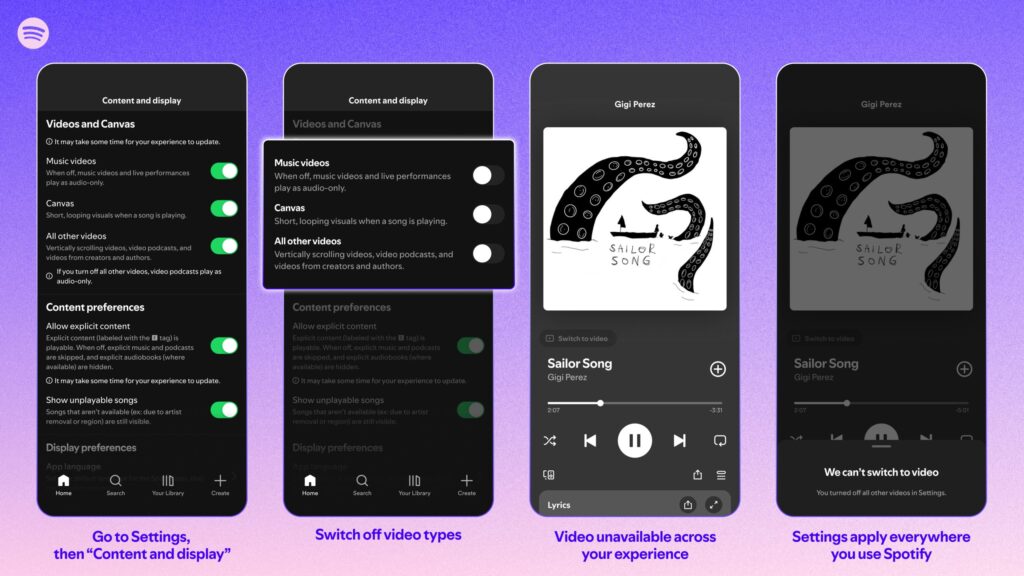
There is a small catch for the free users, though. You will still see video ads, and some audio ads will keep those Canvas-style visuals. Spotify claims they are doing this because they love giving users choices, but let us be real: most people using the app are only there for the music and podcasts, not videos.
We won’t have to wait long to try it out either. This is starting to roll out globally later this month for everyone, regardless of whether you are paying for a subscription or using a free account.